In R, a vector is a series of data elements of the same data type, for example, a series of numbers, a series of characters, or a series of logical values. In finance, for example, the daily profit/loss from your stock investments could be represented as a vector. A vector is also referred to as a one-dimensional array.
An important point to remember is that within a vector, all the data elements must be of the same type, i.e., you cannot mix different data types in the same vector.
In R, you can create a vector using the combine() function. For example, here is a vector containing three numeric values 5, 7 and 8.
1> c(5,7,8)2
Test Your Knowledge
Check your understanding of this lesson with a short quiz.
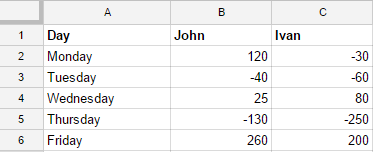
Let's say John and Ivan, two colleagues engage in day trading for a week and want to analyze their daily performance. Their daily profit and loss from the trading activity is shown below:
We can use this data in R by creating vectors and assigning them to variables.
1#John's earnings in the week2john_earnings <- c(120,-40,25,-130,260)3#Ivan's earnings in the week.4ivan_earnings <- c(-30,-60,80,-250,200)5#Print John's earnings6john_earnings
7#Print Ivan's earnings8ivan_earnings
9
Run this script in RStudio (CTRL+ENTER) and you will see the results in RConsole.
1>#John's earnings in the week2> john_earnings <- c(120,-40,25,-130,260)3>4>#Ivan's earnings in the week.5> ivan_earnings <- c(-30,-60,80,-250,200)6>7>#Print John's earnings8> john_earnings
9[1]120-4025-13026010>11>#Print Ivan's earnings12> ivan_earnings
13[1]120-4025-13026014>15
Now that we have the data, we can start working with it to measure performance.
Vector Operations
We will use this earnings data to understand how to perform some important arithmetic operations on vectors.
Combined Earnings Per Day
We can calculate the combined earnings of both John and Ivan by just adding the two vectors. When you add two vectors, the addition is performed member-wise (i.e., each element in the vector is added to the element on the same index in the other vector.
1#John's earnings in the week2john_earnings <- c(120,-40,25,-130,260)3#Ivan's earnings in the week.4ivan_earnings <- c(-30,-60,80,-250,200)5#Calculate total earnings6total_earnings_per_day = john_earnings + ivan_earnings
7#Print total earnings8total_earnings_per_day
9
Run this script in your computer and compare the results with the ones below:
As you can see, earnings for each day are added and assigned to the new variable.
Total Earnings
The next thing we want to know is - "What were their total earnings for the whole week?"
We can claculate thus using the Sum() function in R which calculates the sum of all elements of a vector.
1#John's earnings in the week2john_earnings <- c(120,-40,25,-130,260)3#Ivan's earnings in the week.4ivan_earnings <- c(-30,-60,80,-250,200)5#Calculate John's total earnings for the week6john_total <-sum(john_earnings)7#Calculate Ivan's total earnings for the week8ivan_total <-sum(ivan_earnings)9# calculate total combined earnings for the week10total_earnings <- john_total + ivan_total
11#Print individual totals and combined total12john_total
13ivan_total
14total_earnings
15
Run this script in your computer and compare the results with the ones below:
By visually analyzing the above numbers we already know that John has performed much better than Ivan. However, when we deal with large datasets, such visual scans will not be possible. So, we can give the job of comparing performance to R script.
In the following script, we compare performance as a daily level as well as total. To compare the daily performance, we just have to compare the two vectors. For example, we can check "Did John perform better than Ivan each day?". To do so, we can use the logical operator to compare the two vectors. R will automatically compare each element in the vector and return a boolen value.
1#John's earnings in the week2john_earnings <- c(120,-40,25,-130,260)3#Ivan's earnings in the week.4ivan_earnings <- c(-30,-60,80,-250,200)5#Check if John performed better than Ivan each day6john_vs_ivan <- john_earnings > ivan_earnings
7#Calculate John's total earnings for the week8john_total <-sum(john_earnings)9#Calculate Ivan's total earnings for the week10ivan_total <-sum(ivan_earnings)11#Check if John performed better than Ivan overall12overall_perfromance <- john_total > ivan_total
13#Print John's performance vis-a-vis Ivan's each day14john_vs_ivan
15#Print overall performance16overall_perfromance
17
The results should match our visual understanding of the numbers:
Just like addition we can perform all arithmetic operations on vectors such as subtraction, multiplication, and division. The following example shows the difference between John's and Ivan's earnings each day.
1#John's earnings in the week2john_earnings <- c(120,-40,25,-130,260)3#Ivan's earnings in the week.4ivan_earnings <- c(-30,-60,80,-250,200)5#Calculate difference in earnings6difference <- john_earnings - ivan_earnings
7#Print the difference8difference
9
The results will be as follows:
1>#Print the difference2> difference
3[1]15020-55120604>5
Vector Index
We can retrieve individual values from a vector by referring to its index. For example, you can select the first element in the vector by typing vector_name[1]. Similarly, you can select multiple values from the vector by using the notations demonstrated below:
1>#John's earnings in the week2> john_earnings <- c(120,-40,25,-130,260)3>4>#Ivan's earnings in the week.5> ivan_earnings <- c(-30,-60,80,-250,200)6>7>#Select John's earnings on 3rd day8> john_earnings[3]9[1]2510>11>#Select John's earnings on 2nd and 5th day12>#You can select multiple values by supplying a vector of indexes13>14> john_earnings[c(2,5)]15[1]-4026016>17>#Select John's earnings from 2nd to 4th day18>#To produce a vector slice between two indexes,19>#you can use the colon operator ":". Helpful for large vectors.20>21> john_earnings[2:4]22[1]-4025-13023>24
Naming Vector Members
We learned how to refer to the elements of the vector but it's still difficult to tell which earnings belong to which day. In such situations, we can assign names to the members of the vectors. In our case, we can assign the names of days to the elements. We can do so by using the names() function as shown below:
1#John's earnings in the week2john_earnings <- c(120,-40,25,-130,260)3#Ivan's earnings in the week.4ivan_earnings <- c(-30,-60,80,-250,200)5#Assign the names of the day to John's Earnings vector6names(john_earnings)<- c("Monday","Tuesday","Wednesday","Thursday","Friday")7#If you're applying these names to multiple vectors, you can even8#create a new vector with these names and then assign it.9days_in_week <- c("Monday","Tuesday","Wednesday","Thursday","Friday")10#Assign the names of the day to Ivan's Earnings vector11names(ivan_earnings)<- days_in_week
12#Print John's and Ivan's earnings13john_earnings
14ivan_earnings
15
Let's learn a few more things about vectors using our earnings example. Let's say we want to create a new variable, which contains only the positive earnings. In this case we will use the combined earnings vector for John and Ivan.
Step 1: Create a logical vector that tells us on which days we have positive earnings
1#John's earnings in the week2john_earnings <- c(120,-40,25,-130,260)3#Ivan's earnings in the week.4ivan_earnings <- c(-30,-60,80,-250,200)5#Total Earnings6total_earnings <- john_earnings + ivan_earnings
7#Vector for days in week8days_in_week <- c("Monday","Tuesday","Wednesday","Thursday","Friday")9#Assign the names of the day to Total Earnings vector10names(total_earnings)<- days_in_week
11#On which days did we have positive earnings12#To do so we use comparison operators on vectors. The comparison operator13#will compare each element in the vector if the condition stated by the14#comparison operator is TRUE or FALSE15positive_vector <- total_earnings >016#Print the positive_vector17positive_vector
18
The positive vector should look like this:
Step 2 is to use the positive selection vector to slice the positive earnings from total_earnings vector.
1>#Select the positive earing days from the total_earnings vector23> positive_earning_days <- total_earnings[positive_vector]45>67>#Print the positive earnings days89> positive_earning_days
1011Monday Wednesday Friday
1213901054601415>16
In the second step, we used the logical index vector to slice our earnings factor. If the logical value is TRUE, the member is included in the resulting slice, otherwise not.